emergency notification service

Products

Emergency Dialer
Emergency Communications
Emergency Dispatch Service
Phone Contact Service

emergency notification service

Emergency Applications

Forest Fire Warning
Fire Warning and Alert
Health Warning / Alert
Crime Warning Alerts
Tornados and Tornado Warning Alert
Hurricanes and Hurricane Warning Alert
Blizzards / Snow Storms
Floods and Flood Warning System
Chemical / Biological
Earthquakes and Earthquake Warnings

emergency notification service

Disaster Recovery Auto Dialer
Emergency Notification System
Emergency Response Service
Community Alert System
Severe Weather Warning
Civil Alert System
Alert Warning System
Disaster Recovery Center
Emergency Broadcast System
Flood Warning
Forest Fires Alerts
Evacuation Notification


blizzards hurricanes tornados floods forest fires

911 technical documentation

911 Broadcast - Web User Guide

Emergency Notification Systems

Emergency Broadcast Main Menu Web Page
Emergency Notification Systems

Administrator Main Menu Web Page

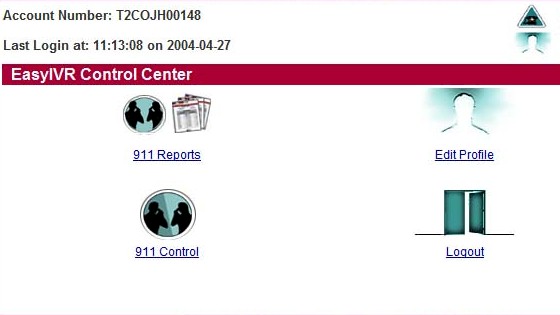
Once the Administrator logs into the Network Emergency Notification Phone System, the above Main Menu appears. Using this web page, the Administrator can navigate to the various Emergency Notification functions including defining campaigns to running the actual emergency notification voice broadcast. This is required to perform any emergency phone broadcast function.

The following adminstrative functions can be performed from this Main Menu:
  • 911 Reports - Produce Online Emergency Notification Service Reports
  • Edit Profile - The administrator can modify user profile information including organization name, address, passwords, etc.
  • 911 Control - This function lets the administrator define and execute Emergency Notification campaigns
  • Logout - This button allows the administrator to exit from the Emergency Notification Web Page.