emergency notification service

Products

Emergency Dialer
Emergency Communications
Emergency Dispatch Service
Phone Contact Service

emergency notification service

Emergency Applications

Forest Fire Warning
Fire Warning and Alert
Health Warning / Alert
Crime Warning Alerts
Tornados and Tornado Warning Alert
Hurricanes and Hurricane Warning Alert
Blizzards / Snow Storms
Floods and Flood Warning System
Chemical / Biological
Earthquakes and Earthquake Warnings

emergency notification service

Disaster Recovery Auto Dialer
Emergency Notification System
Emergency Response Service
Community Alert System
Severe Weather Warning
Civil Alert System
Alert Warning System
Disaster Recovery Center
Emergency Broadcast System
Flood Warning
Forest Fires Alerts
Evacuation Notification


blizzards hurricanes tornados floods forest fires

911 technical documentation

911 Broadcast - Web User Guide

Emergency Notification Systems

911 Control > Stop Emergency Broadcasting
Emergency Notification Systems

Stop Emergency Broadcasting

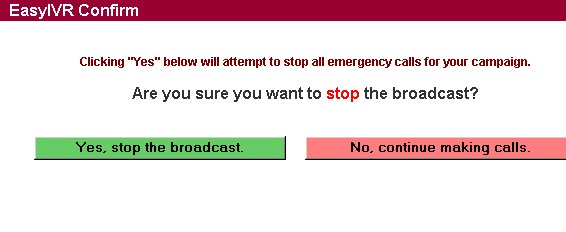
After the administrator has started a voice broadcast campaign, it can be stopped by using this menu. Very simply, you can stop a broadcast or cancel this request. NOTE: When running a campaign over a network emergency broadcast system, if the campaign is spread over multiple dialers and associates, the termination of the campaign may not occur instantaneously.

The following options are available from this screen:
  • Yes, stop the broadcast - This terminates the campaign
  • No, continue making calls - Cancel this request and continue the campaign