|
|


Emergency Alert Systems
 This section of our technical library presents information and documentation relating to Emergency Notification Systems and Disaster Recovery Applications.
If a dangerous chemical spill occurs in your community, you can target specific areas to call. Should an emergency arise in your community, our emergency broadcast phone service can deliver large volumes of phone messages quickly using thousands of digital and analog phone lines simultaneously. If a severe snow storm hits your area, your community can be notified of school closings or event cancellations. In the event of a blizzard, wild fire or devastating flood, your community can be notified quickly given specific instructions if an evacuation is required using our emergency broadcasting service.
This section of our technical library presents information and documentation relating to Emergency Notification Systems and Disaster Recovery Applications.
If a dangerous chemical spill occurs in your community, you can target specific areas to call. Should an emergency arise in your community, our emergency broadcast phone service can deliver large volumes of phone messages quickly using thousands of digital and analog phone lines simultaneously. If a severe snow storm hits your area, your community can be notified of school closings or event cancellations. In the event of a blizzard, wild fire or devastating flood, your community can be notified quickly given specific instructions if an evacuation is required using our emergency broadcasting service.
911 Broadcast - Client User Guide
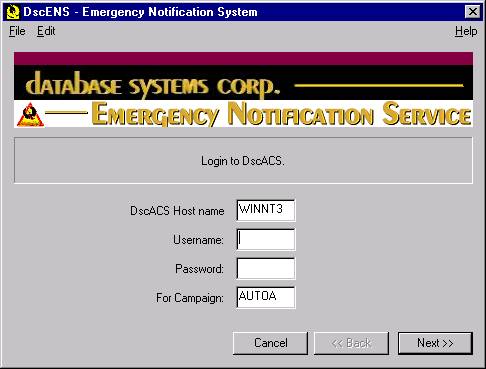
Client Login
The Administrator logs into the Network Phone System using this screen. This is required to perform any emergency phone broadcast function.
The following information is entered by the administrator to gain access to this system:
- DscACS Host Name - This name identifies the named server on which the DscACS Network Phone System resides.
- Username - This must be a valid username defined for DscACS.
- Password - A valid password associated with the above Username.
- Campaign - This must be an existing campaign into which the User is logging into.
Table Of Contents
The Client User Guide is divided into the following sections:
|